I’m building a flow that needs to behave differently depending on the user who is logged in. For example, users from the Sales department should only see certain steps, while Finance users should follow a different path in the same process.
I know that the environment variable provides information such as userId, environmentType, and clientType. However, I would like to know if there is any native way in Novacura Flow to manage user roles or groups — for example, something similar to swimlanes, permissions, or user-based routing.
If that’s not possible, what would be the recommended approach to handle this kind of role-based split?
(For instance, using a script with environment.userId, a custom table with user roles, or another best practice.)
Unfortunately, the users running the app at the time of writing do not have access to the APIs where they can check role membership. It has been discussed, if you want to follow the progress you can create an idea at ideas.novacura.com.
But for now, both your solutions would work fine, using a global flow script where you keep the data or a SQL table where you store the userId and something (“Finance”, “Warehouse”, etc) that indicates which path to take (combined with a decision step in the app).
i have used the environment connector to first fetch the roles for a user and then script / decision /assertion steps to restrict access / execution based on a role.
For now (until the API is exposed and useable) I would recommend simply creating a csv file with two columns: user, role. Input all your users and preferred roles into said csv file. Then, create a Table Step, and import the csv.
Once you do that, you can then use scripts to determine which user should see what.
Thanks, Daniel

Is there any documentation on how to use swimlines in Flow Connect? I see that the existing documentation I found is classic, and most of the features don't exist in Connect.
Thank you for your response. However, what steps should I follow to create the intermediate table? I was thinking of creating a table with the information, then adding a decision point to validate whether it is a specific role — if it is, it should follow the sales flow; if not, the finance flow. Could you please explain if this is the correct approach, what components I should use, and if not, could someone tell me what steps I should take instead?
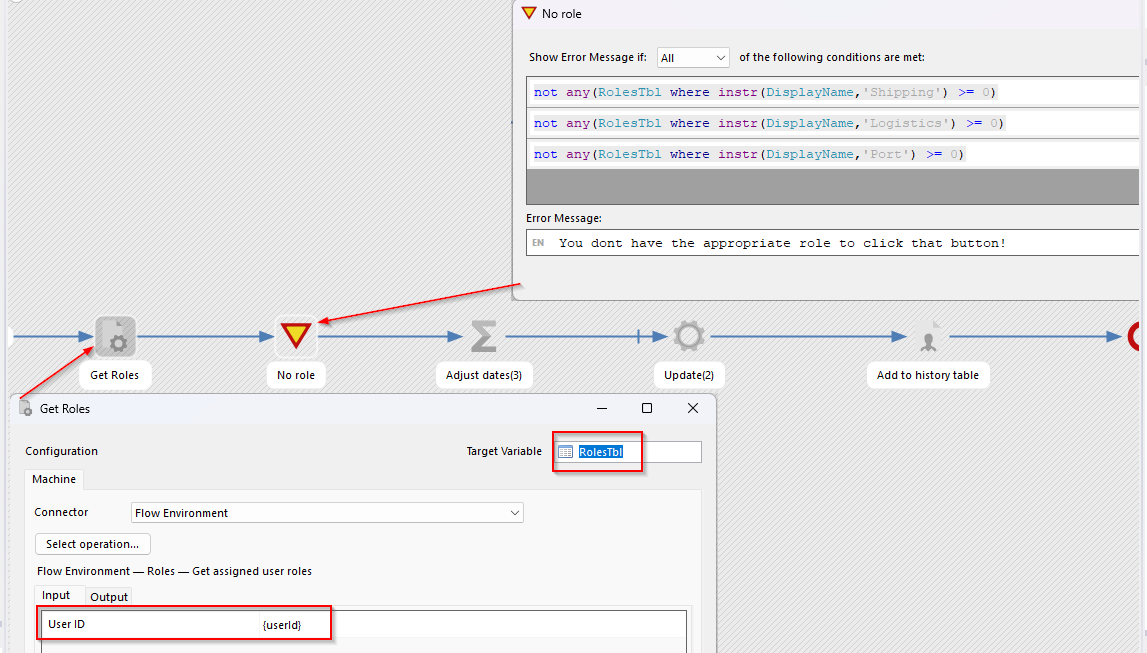
 )
)